 Sign In
Do you need to test your printer online? Then, you are in the right place. Printing this ultimate Print Test Card using our IDpack Print Engine is the best way to try your desktop card printer and see its capabilities.
- Click the
 on the right or the three dots or double arrows, then select Print.
 - In “Destination” or “Printer”, select your card printer.
- In “More settings” > “Scale”, choose “Default” or “Actual size”.
- In “More settings” > “Quality”, you can change the quality to 300, 600, or 1200 dpi to match your printer’s maximum dpi.
When you are ready, click Print.
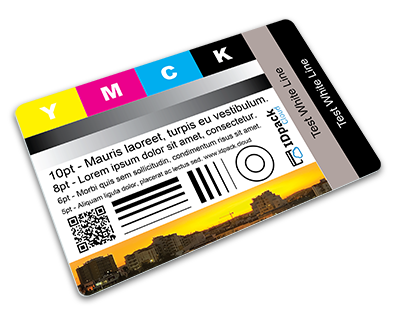
Our test card includes elements to verify the printing quality like:
- YMCK color rectangles
- Line height and width
- Text in different font sizes
- Gray gradient
- Ribbon calibration
- Printhead alignment
- Check for white lines
- Vivid color testing
- QR Code
- and much more
After printing, you should get this:
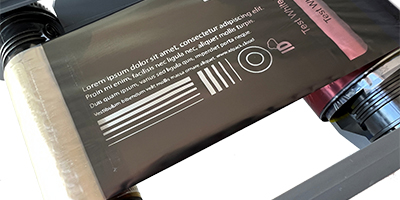
You can also take the ribbon out of the printer, unwind it, and look at the K panel. You should get something like this:
If the preview does not display, open the Print Test Card in a new tab.